Router
The Router feature contains three routers (message routing, sACN, PSN), and a message history tab.
This allows the sending of messages from one destination to multiple sources with filters. The message router crosspoints can be automated via the OSC API.
Message history (messages tab) is an audit trail of what happened.
Message routing
Section titled “Message routing”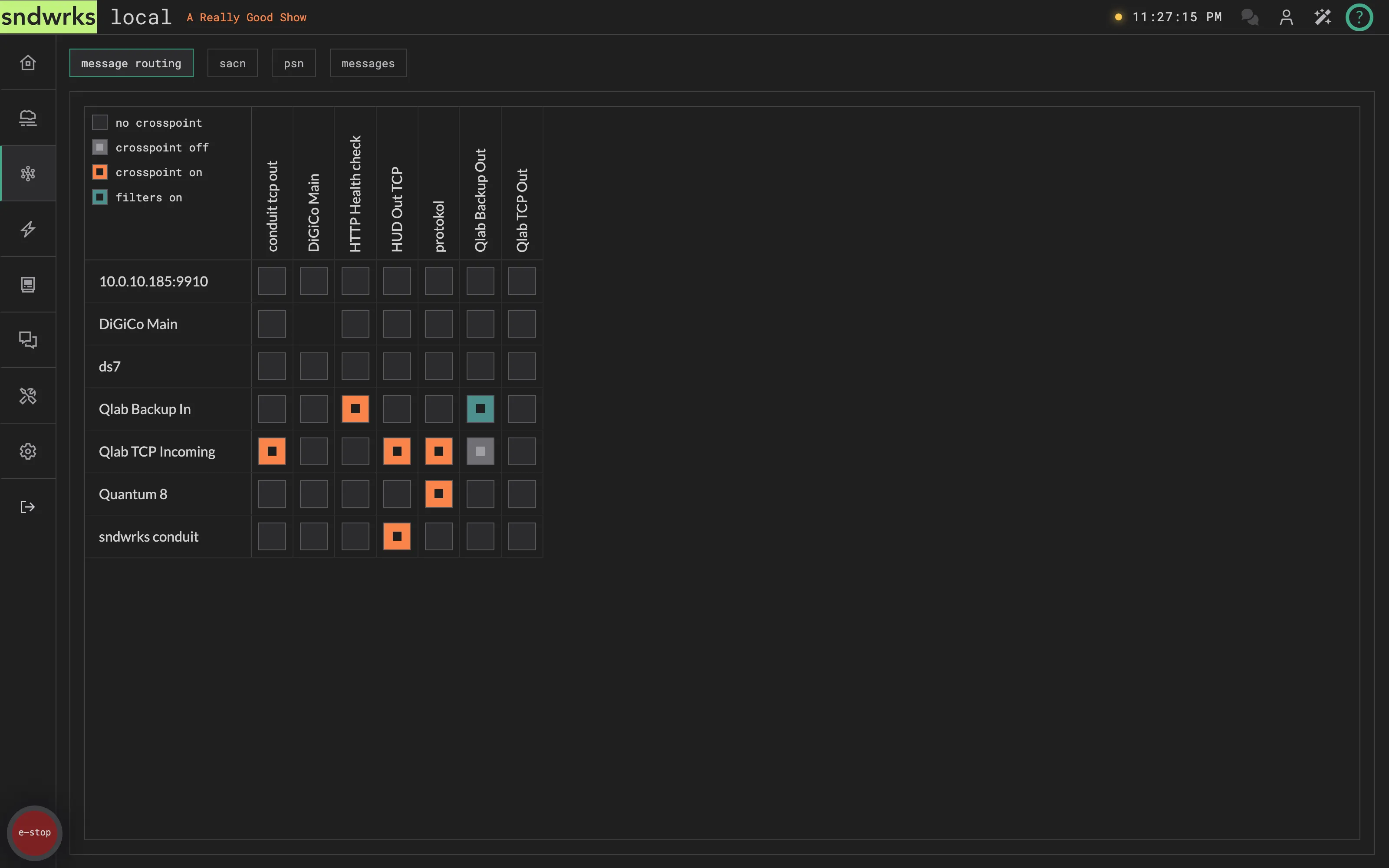
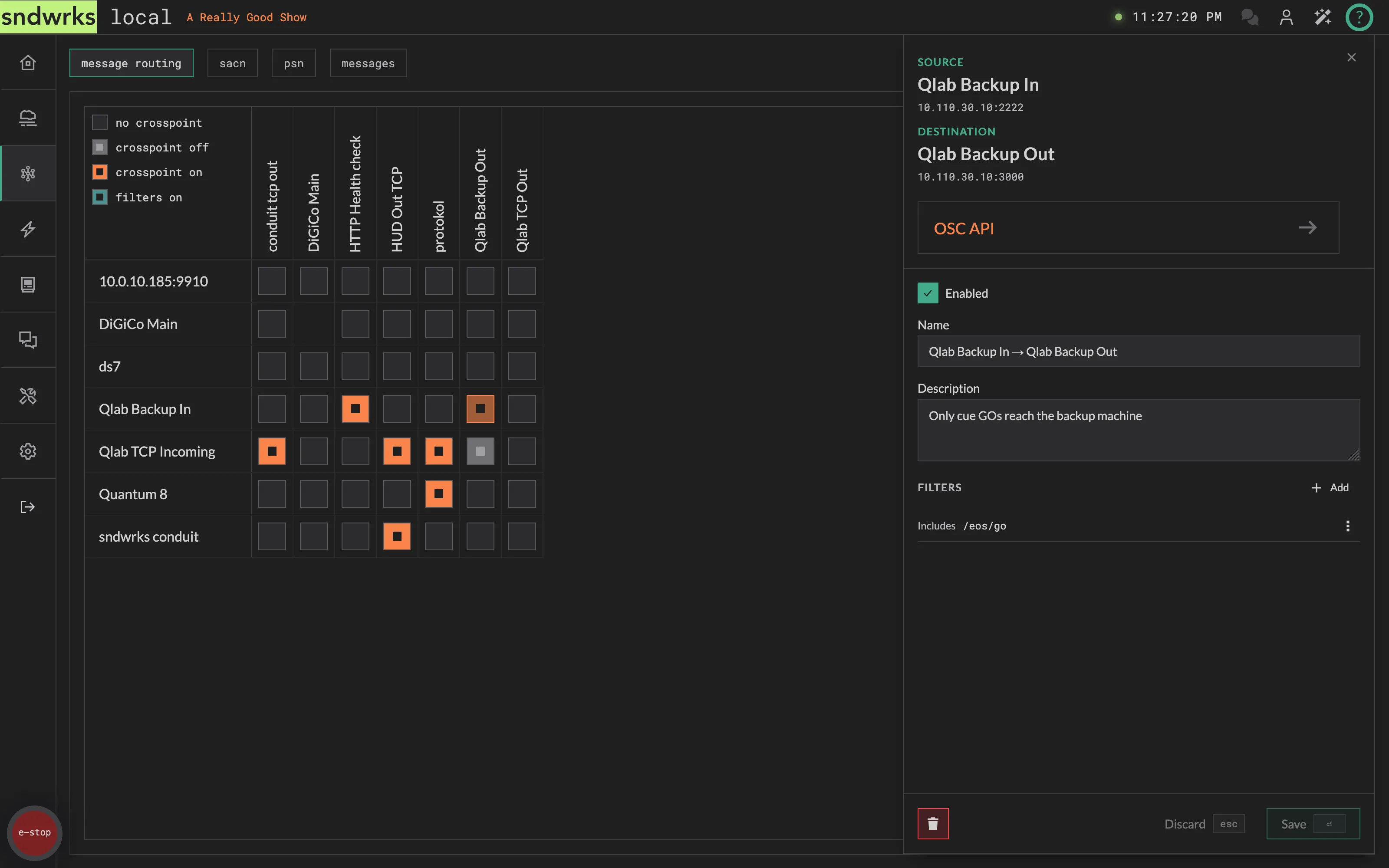
The message router sends messages from sources to destinations. This is selectable via the routing matrix.
Route a message
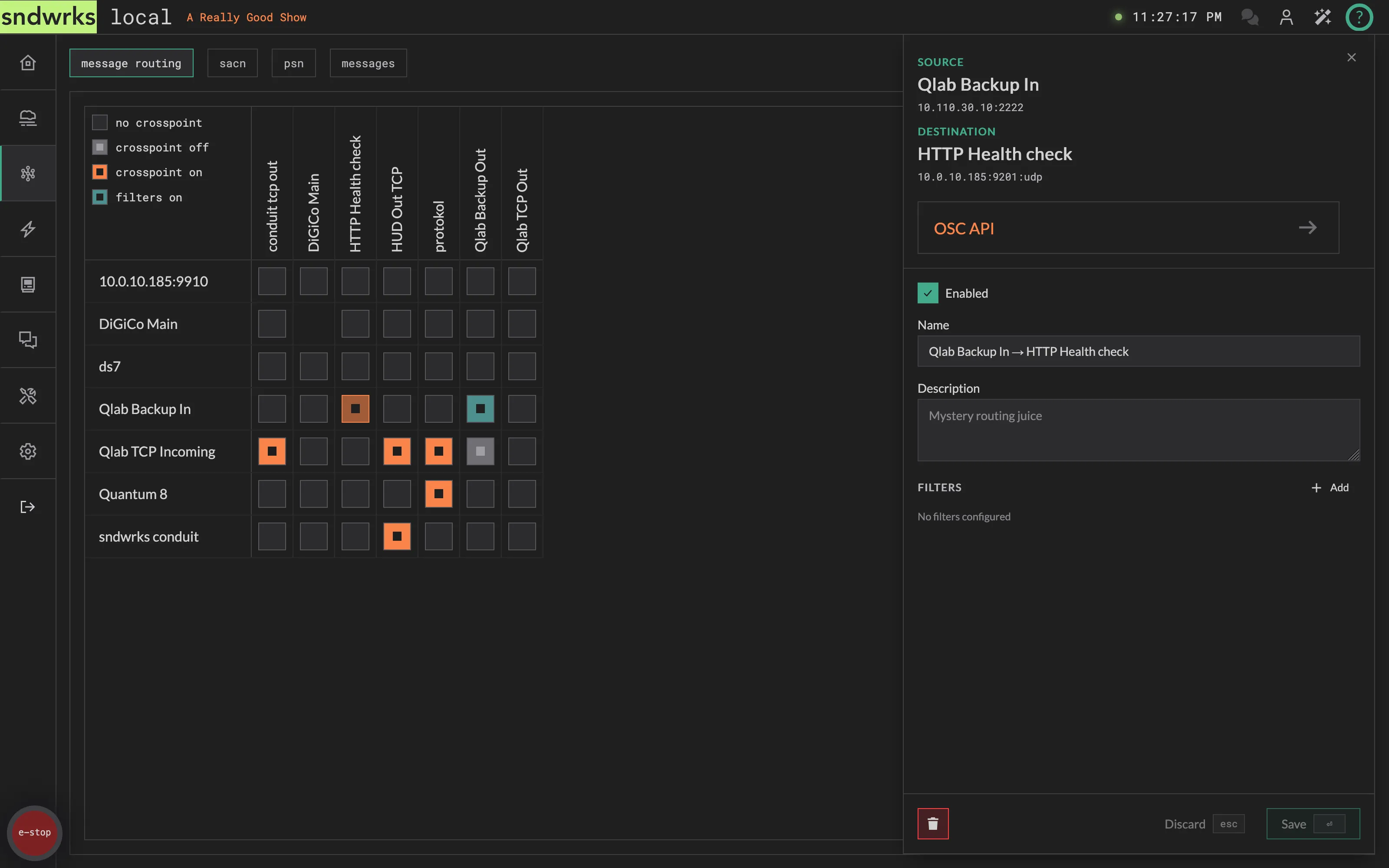
Section titled “Route a message”- Click on the crosspoint you want to activate
- Check Enabled
- Optionally adjust the name and description. We autofill a name like
QLab Backup In → HUD Out TCP - Add filters if you want them.
- Press
⏎to save, orescto discard, or click the buttons there.
Crosspoints
Section titled “Crosspoints”This is the heart of the message router.
The crosspoints have four states as indicated in the legend in the top left corner:
- No Crosspoint: nothing happening here
- Crosspoint Off: this crosspoint exists but is currently not routing anything
- Crosspoint On: this crosspoint is actively routing
- Filters On: this crosspoint is on AND it has filters
Clicking a crosspoint opens its editor on the right.
Crosspoint Filters
Section titled “Crosspoint Filters”The crosspoint filters allow for only specified messages to be passed along a crosspoint. This is helpful to reduce traffic or only allow needed traffic. You can add multiple filters to further narrow down the subset of messages that are routed. The filters are executed in order.
For example, you may have a lighting console on your network that is spitting out lots of information but you only want go’s to end up at another destination.
The filters have 6 options:
- Includes: This allows any message that includes the filter pattern. Example:
Includes - 'cue'would allow/cue/12cuefast/a/very/long/address/with/cueetc. - Does Not Include: The exact opposite of includes. If the filter pattern is anywhere in the message it won’t be routed.
- Matches: This is like includes but it is an exact match of the filter pattern.
- Does Not Match: The opposite of matches.
- Starts With: Allows messages that start with the filter pattern. Similar to includes but just a bit more specific.
- Ends With: Allows messages that end with the filter pattern.
sACN routing
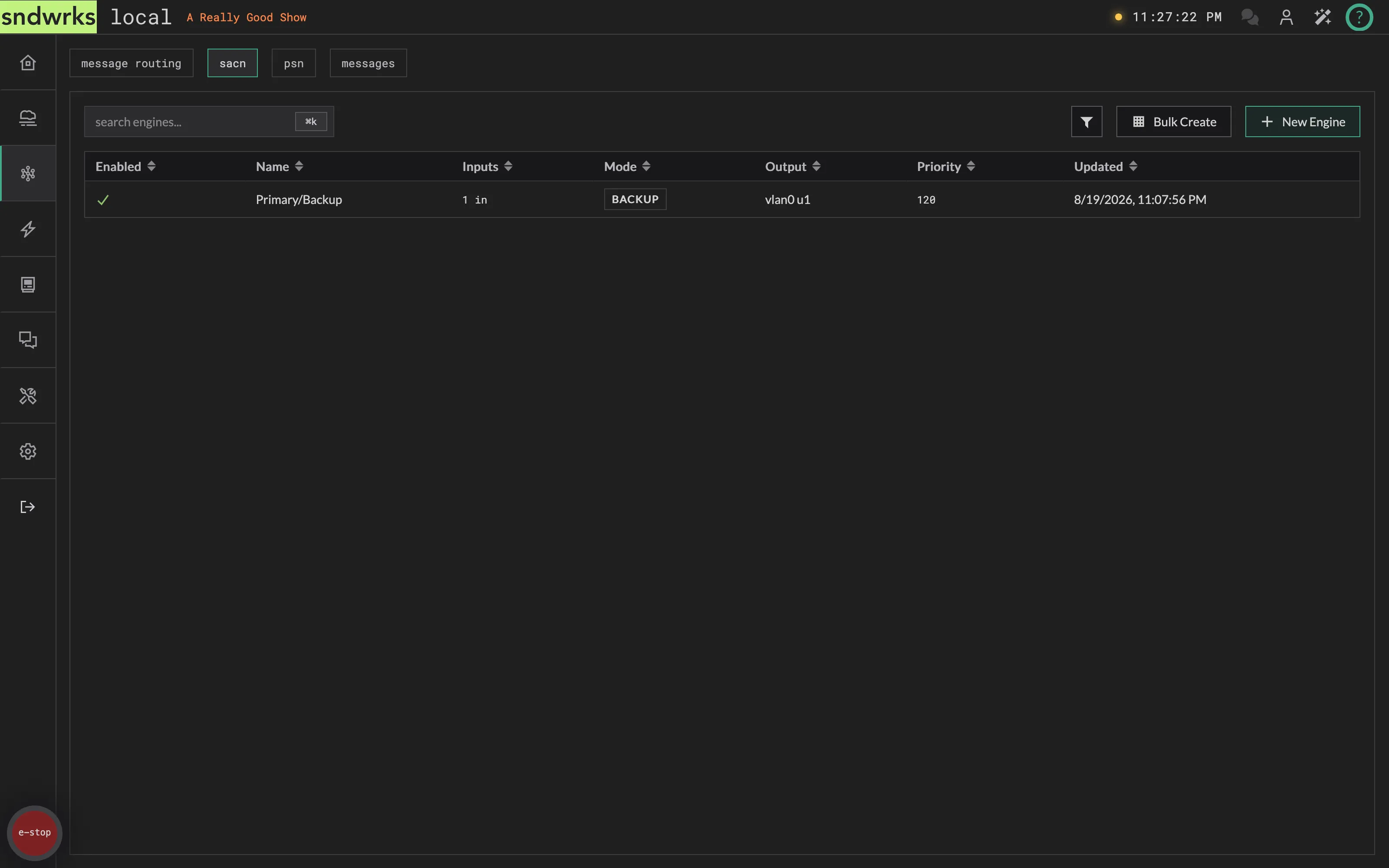
Section titled “sACN routing”sACN routing is built out of engines. An engine takes up to four sACN inputs, merges them with a rule you choose, and sends the result out as a single universe on a single interface.
The sACN tab lists every engine you have built:
| Column | What it shows |
|---|---|
| Enabled | A check when the engine is running, a dash when it isn’t |
| Name | The engine name |
| Inputs | How many inputs are attached. Hover it to see each one as interface u<universe> |
| Mode | The merge mode: HTP, LTP, Priority or Backup |
| Output | The output interface and universe. A warning icon appears here if another engine sends to the same interface and universe |
| Priority | The priority override, or — when there isn’t one |
| Updated | When the engine was last saved |
Above the table are a search box, a filter button (filter by mode, interface, or enabled state), Bulk Create, and New Engine. Before you build anything the page reads No engines yet. Add one to start routing sACN.
Create an engine
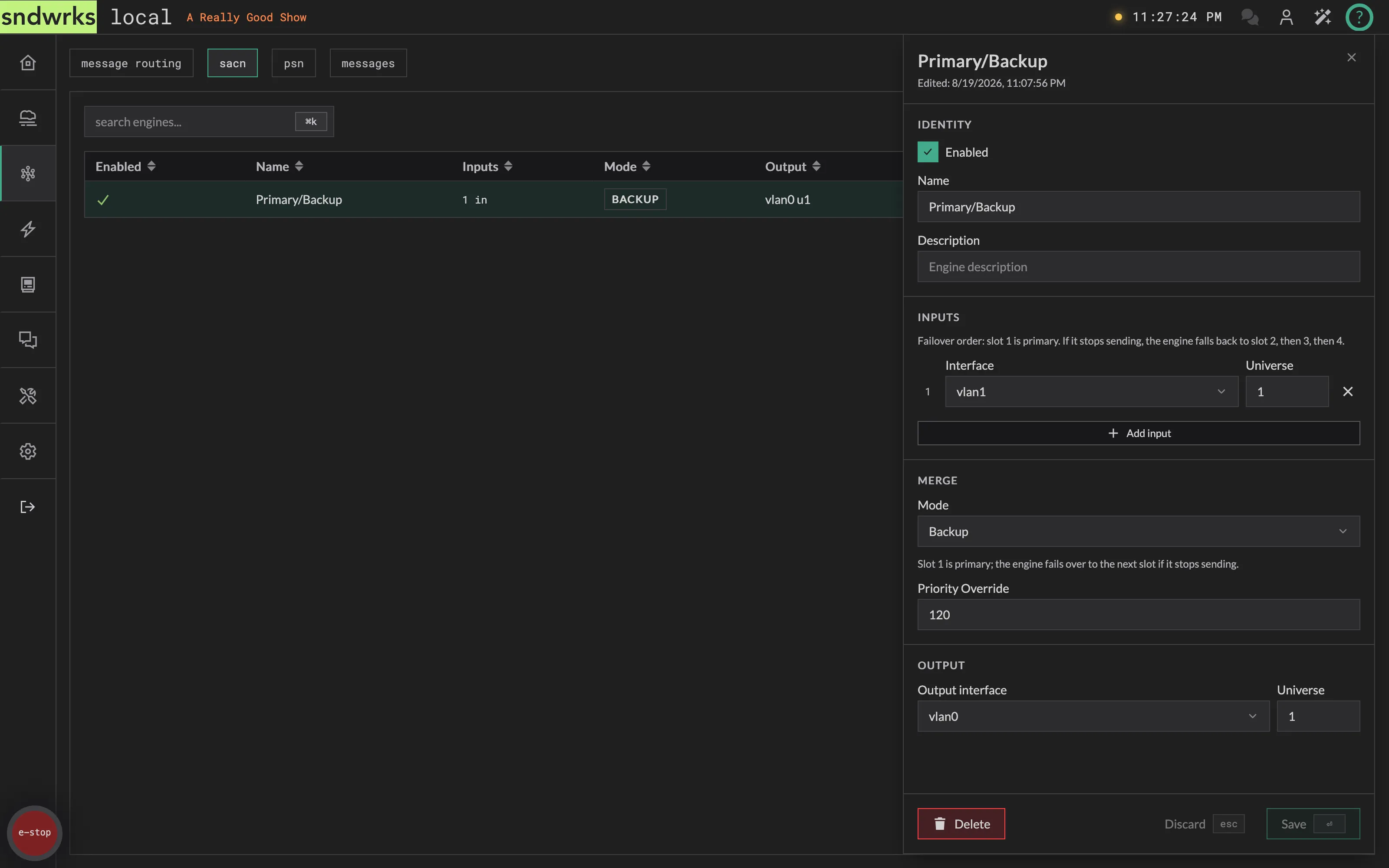
Section titled “Create an engine”- Click New Engine. The editor opens on a draft called
New Engine. - Under Identity, check Enabled and give the engine a name and description.
- Under Inputs, click Add input and pick an interface and a universe. Add up to 4 inputs — the
×on the right of a row removes it. - Under Merge, choose a Mode, and set a Priority Override if you need one.
- Under Output, pick the interface and universe the merged result goes out on.
- Press
⏎to create it, orescto discard, or click the buttons there. On an engine that already exists that button reads Save.
An engine with nothing attached reads No inputs attached. This engine has nothing to route. and won’t save. Delete removes an engine, behind a confirmation.
The slot numbers down the left of the inputs are the failover order, and they aren’t editable. To reorder inputs, remove them and add them back in the order you want.
Merge modes
Section titled “Merge modes”The mode decides what happens when more than one input is sending to the same engine.
| Mode | What it does |
|---|---|
| HTP | Highest Takes Precedence. Per channel, the highest level across every live input wins. Per-address priority is deliberately ignored here — HTP is a level comparison, not a priority scheme. |
| LTP | Latest Takes Precedence. The input that most recently changed supplies the whole frame. A console idling with unchanged levels does not steal control, no matter how fast it repeats itself. If two inputs change at the same moment, the lower slot keeps it. |
| Priority | The input with the highest sACN priority wins, decided per channel. If a source sends per-address priority we use that, otherwise we use the priority on the packet. A per-address priority of 0 means that source isn’t sourcing that channel at all. Ties fall back to highest-level between the tied inputs. |
| Backup | Slot 1 is primary. If it stops sending, the engine falls to slot 2, then 3, then 4. The winning slot supplies the frame untouched, and the moment slot 1 comes back it takes over again. |
Priority override
Section titled “Priority override”Leave Priority Override empty and the engine passes along the priority of whichever source won the merge. Set it and every packet the engine sends carries that value instead.
Valid values are 0 to 200. Note that 0 is a real priority, not the same as leaving the field empty, so an override of 0 is sent as 0.
Bulk create engines
Section titled “Bulk create engines”Bulk Create builds a run of engines in one go, which is the quick way to forward a block of universes from one interface to another.
- Click Bulk Create.
- Enter a Base Name, like
Stage. - Pick a Source Interface and a Source Universe Range, like
1-8. - Pick a Destination Interface and a Destination Universe Range, like
101-108. - Click Create Engines.
Ranges take single values, commas and dashes — 1,3-5,8 is valid. Both ranges have to work out to the same number of universes, and one run is capped at 100 engines.
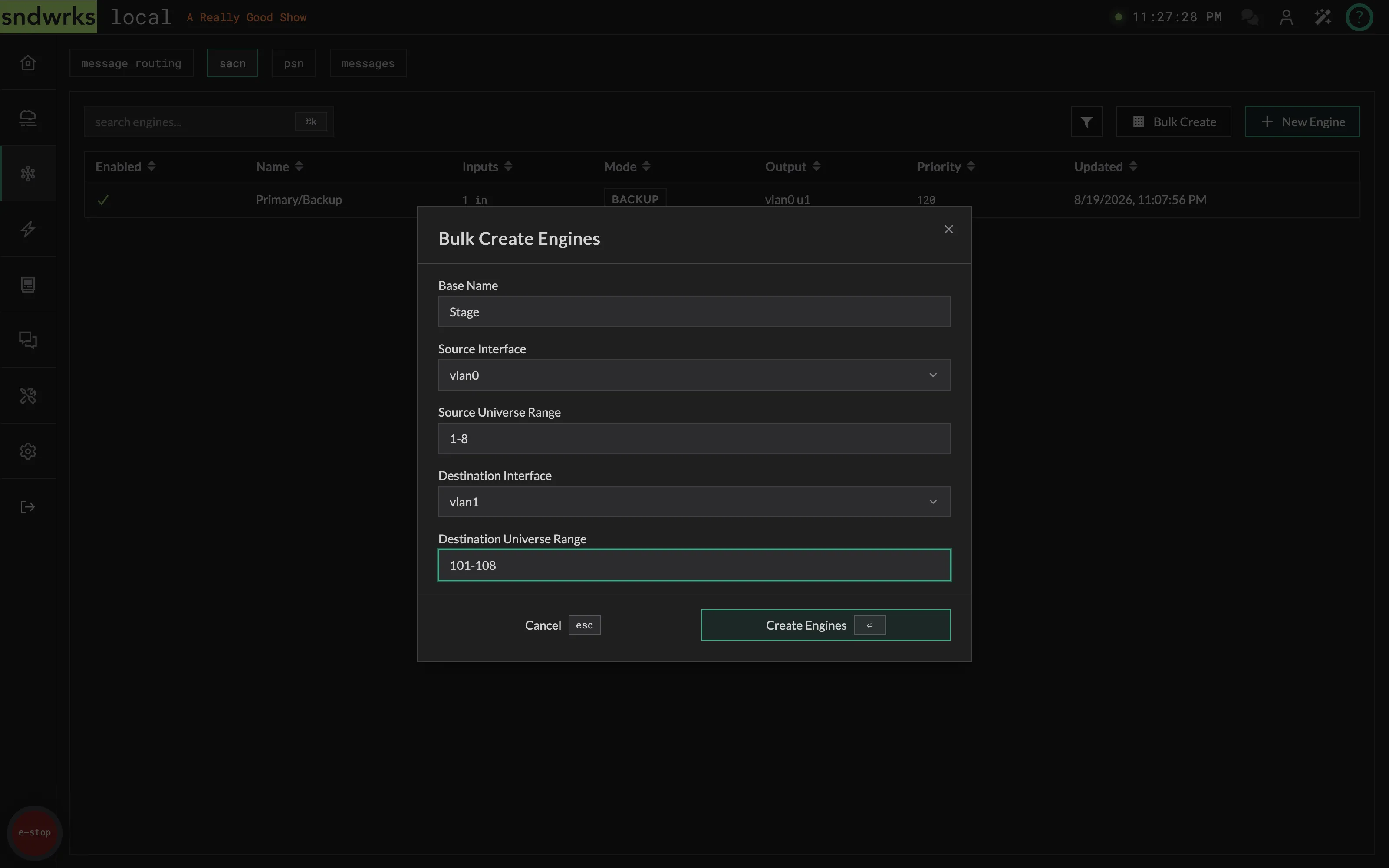
What you get back is a set of independent, single-input engines named <base name> <source universe>. The ranges themselves aren’t stored anywhere, so there’s no mapping to go back and edit later — from that point on each engine is edited on its own.
Why won’t it save
Section titled “Why won’t it save”The editor blocks a save until:
- The engine has a name.
- It has between 1 and 4 inputs, each with an interface chosen.
- Every universe, input and output, is between 1 and 63999.
- The priority override is between
0and200, or empty.
Some things that look wrong but are allowed on purpose:
- Two inputs can point at the same interface and universe. We collapse them onto one listener behind the scenes.
- Several engines can output to the same interface and universe. Sometimes that’s what you want, so it shows up as a warning icon on the Output column rather than an error.
- An engine can input and output on the same interface and universe. An engine will never re-ingest its own output, but a loop out through another device and back is not something we can stop.
PSN routing
Section titled “PSN routing”PosiStageNet carries live position data for performers, automation, and moving scenery. The PSN tab forwards it between network interfaces using a crosspoint matrix.
There is nothing to merge and nothing to map here. PSN is all-or-nothing per route: whatever tracking data arrives on the source interface goes out the destination.
If you need mapping, you can do that in macros.
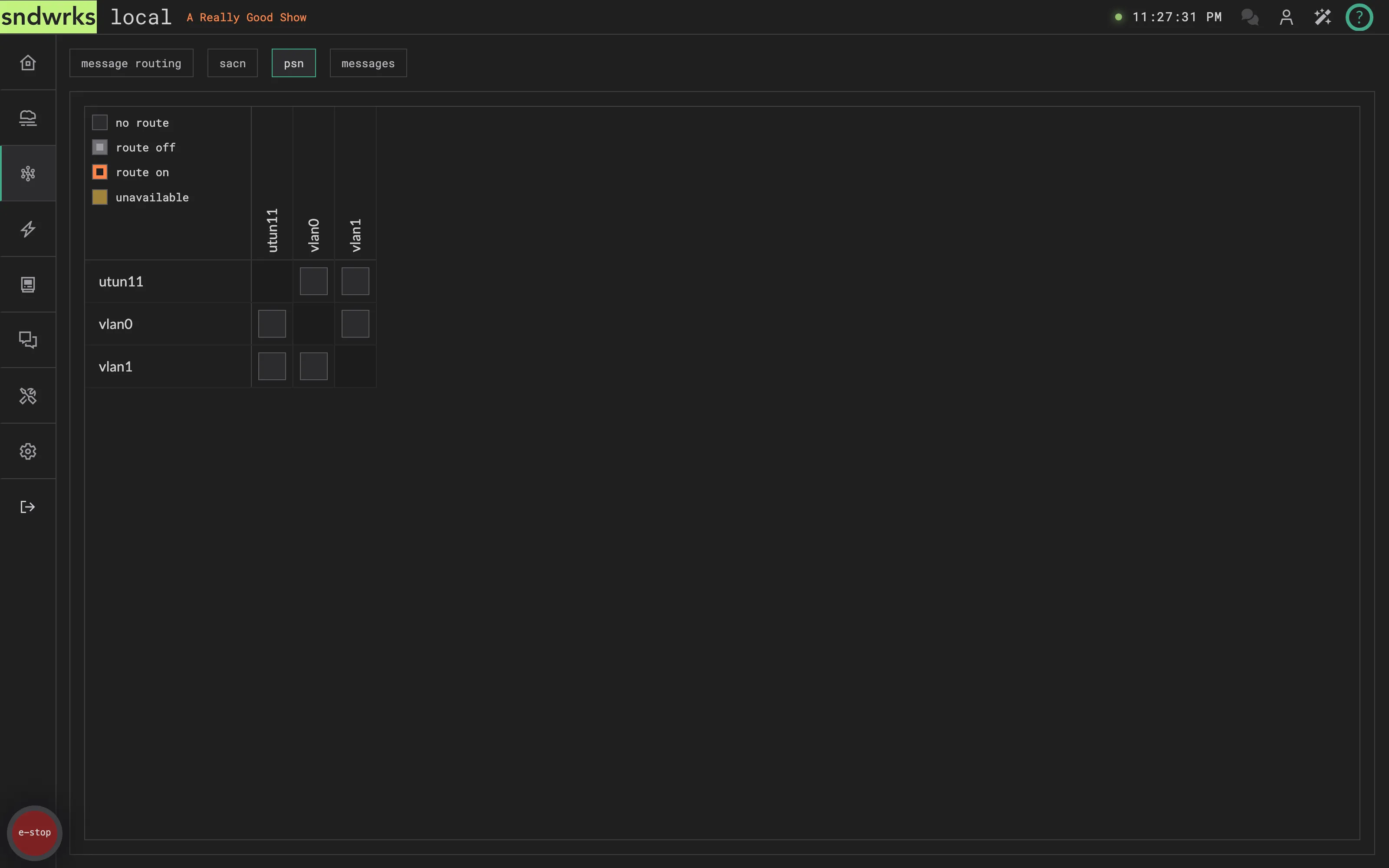
Route PSN
Section titled “Route PSN”- Click the crosspoint where your source interface meets your destination interface.
- Check Enabled.
- Optionally adjust the name and description. We autofill a name like
Port 3 → Port 5. - Press
⏎to save, orescto discard, or click the buttons there.
Which interface the server listens on, and on what address and port, is set in Settings → PSN. To see what’s actually arriving, use the PSN Monitor on the Utility page.
Messages
Section titled “Messages”This tab shows all the messages that have been received and sent by the server including OSC API. The search bar will filter for anything in the messages including bits like OSC arguments.